Think of all the businesses using Drupal and how many are trying to get those anonymously browsing users to engage with their site. Conversion of anonymous users to paying customers is the goal of just about every business. The question many business owners ask is, "How can we leverage our investment in Drupal, make it more appealing and have people interact with us?"
Nextide helps businesses transform their brochure-ware Drupal site into a business application that drives revenue. We've distilled the nuance of automating business processes initiated by anonymous Internet users down to a simple to follow use case demonstration where you can kick off a Maestro workflow as an anonymous user to get an insurance quote, interact with the insurance company and get real-time information as to where your quote request is in the process.
About the project
Maestro Insurance is not a real company. Our goal at Nextide was to showcase and demo how you can engage with anonymous users and automate the process of customer onboarding with Maestro.
The Maestro module is a business process workflow solution that allows you to create and automate a sequence of tasks representing any business, document approval or collaboration process.
If it can be flow-charted, then it can be automated with Maestro.
Workflows typically include the movement of documents or forms for editing with review and/or approval steps. A number of condition checks can be incorporated through simple admin functions and without any coding. The process of requesting, reviewing and quoting of a home or auto insurance policy is an example of a business process that requires a form to be routed between multiple parties (internal or external). Normally the workflow to be automated is a business internal process but it can either start with an outside "anonymous" submission or at different parts of the workflow process.
The Requirements
The requirements for the site came from a distillation of numerous anonymously kicked-off workflow processes we've helped companies implement. The choice to use something many of us have dealt with, an insurance quote, was something we've done for a customer, but also is similar in form to many other onboarding style workflows. Many people who ask Nextide for assistance with their business process automation are either intimidated or even confused with how to even start! Maestro Insurance is an excellent demonstration on how we can quickly transform an idea into reality with Drupal and Maestro.
The Outcome
You can run the Insurance Quote Request demonstration yourself by visiting the website. Here's how it functions:
We begin with a simple webform that is easy to understand and fill.
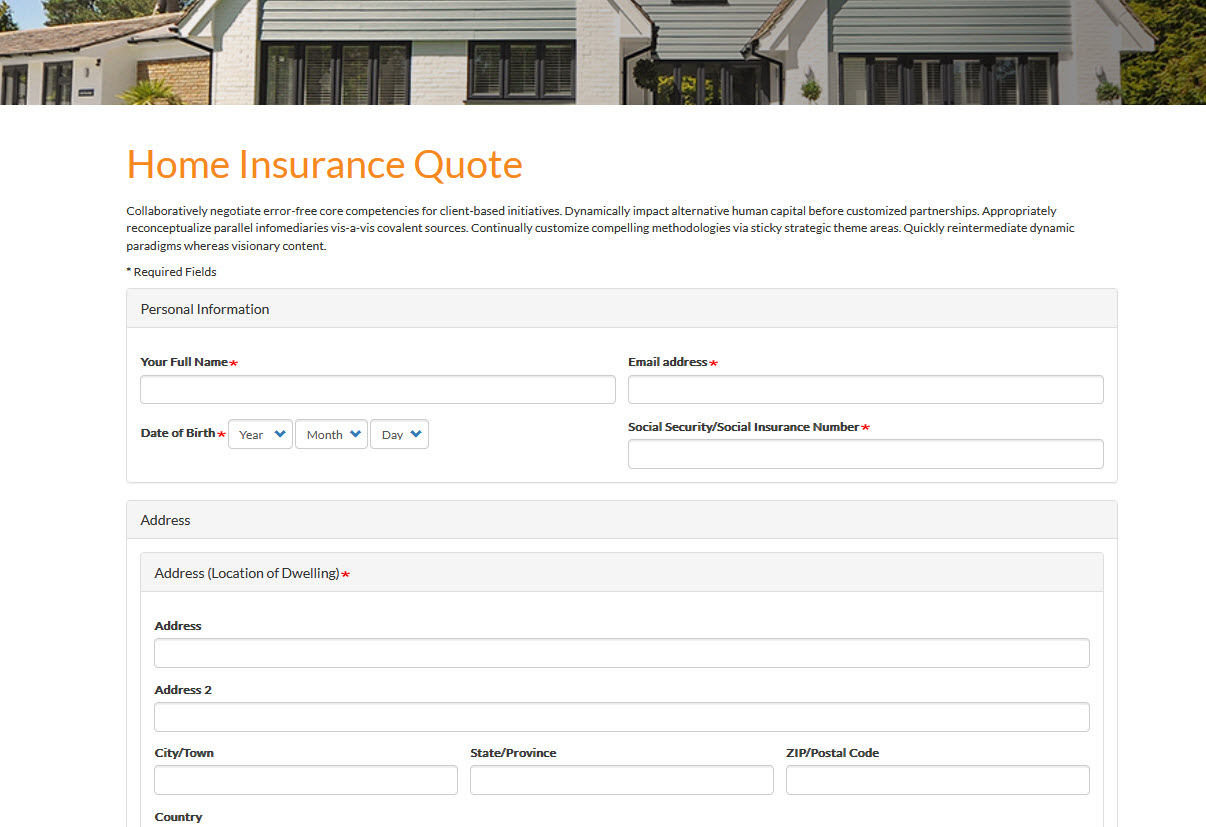
Once you fill in your automotive or homeowners quote request, a Maestro workflow is kicked off where we
- Create a Drupal user based on the email address provided in the form. Yes, garbage in, garbage out in terms of fake email addresses. However, those fake account are easily purged if the user does not respond or interact with the site in a reasonable amount of time. A proper email address vetting mechanism should be instituted for a proper business process flow.
- Detect what type of quote request we have: automotive or homeowner.
- Allow an initial agent's review of the request. If the agent needs more information, a task is routed back to the initiating user.
- Since the user is no longer anonymous we assign a task to the newly created anonymous user and send them an email requesting feedback.
- Feedback is collected and injected into the quote request.
- Agents review and if accepted, Maestro routes the request to the appropriate underwriting team.
- Underwriters can also request more information, which Maestro will create a task for the newly created anonymous user and send them an email requesting feedback.
- Once underwriting is finished, a quote is created and revealed to the newly created anonymous user.
Of course, this is a demo. The real-world scenarios that we automate will have vetted the user for authenticity and would only reveal quotes, information or other sensitive information if the user was deemed valid.
Here's what the workflow looks like:
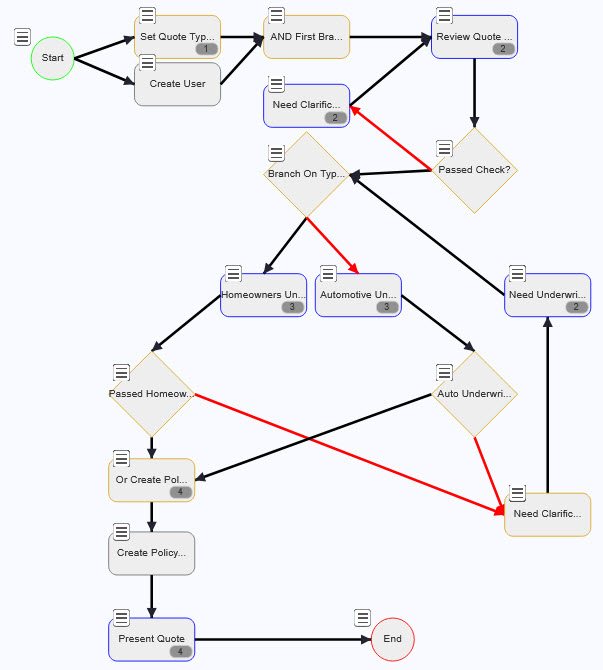
This is a simple flow, distilled down from much more complex business processes for ease of use and to expedite a demonstration.
The Maestro Insurance site is available for those who wish to explore business process automation and give Maestro a try. We have explanation videos and even a breakdown of how the site was built. What you'll notice is how the complexity of a business process is completely shielded from end users and only simple to use interfaces are exposed.
Why Drupal was chosen
The companies for which Nextide works with are either considering using Drupal for their business applications or are existing Drupal users who wish to get more out of their Drupal investment.
When you combine Maestro and Drupal, an incredibly powerful business automation experience is created that allows businesses to use their Drupal investment as a way to convert anonymous users to paying customers and also manage their business automation needs.

Technical Specifications
Drupal version:
Key modules/theme/distribution used:
Drupal as a platform to create business applications is second to none. The available modules, the ability to make rich and functional websites and the excellent developer experience allows for these types of robust business applications to be created.
Maestro is the only business process automation engine available on Drupal and has been under constant support and development by Nextide since its inception in 2003. Business processes deal with humans, exceptions and edge cases which Maestro has proven to be capable of automating for years.